
Transmitting Files via the Hot Folder
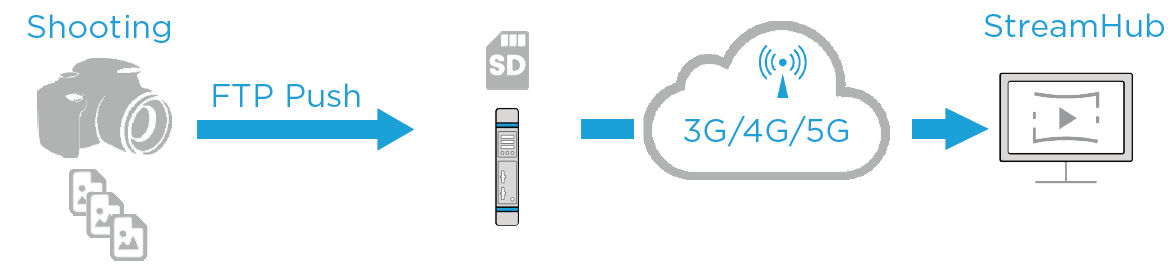
The Hot Folder function enables you to transmit files (e.g., photos) automatically over unmanaged networks wherever the action is taking place. This function uses an FTP push to transmit files following the FIFO method (First In, First Out). You can enable or disable the function as required.

Note
You can manage the hot folder content on the SD card as you wish.
Please refer to the procedure about deleting files in Deleting Files from the SD Card.
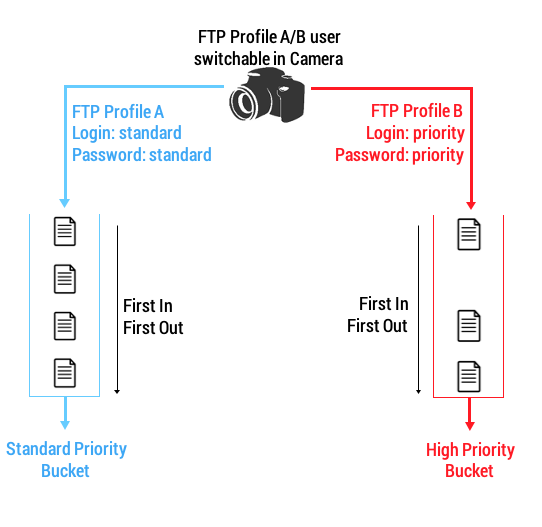
Files can be transmitted according to 2 priority levels (standard or priority), as defined on the device that transmits files.
To enable / disable the hot folder function:
Unit Panel
From the Home menu, tap
 .
.Tap
 and select
  .
.Tap
 to enable or
  to disable the Hot Folder option.
Web Interface
Click Settings > Forward.
Click
 or
or  to toggle between enabling and disabling the Hot Folder function.
After enabling the Hot Folder function, the  icon appears in the upper bar. Files are automatically forwarded following the priority levels defined on the camera (standard or high priority). When the file transmission starts, the forward action can be seen on screen.