Selecting the Video Source
You can select amongst:
Auto
SDI input
HDMI input - SD (PAL/NTSC) standard is not supported
Pattern (Internal Pattern Generator)

Note
When selecting the Pattern generator as the source, you can select a specific pattern to be generated. The pattern options are: color circles, color bars or a black pattern.
You can also select one of the following standards: NTSC, PAL, 720p50, 720p59.84, 720p60, 1080p25, 1080p29.97, 1080i59.94, 1080i60, 1080p50, 1080p59.94 and 1080p60.
When the Auto mode is selected (default mode), the rules in the table below are applied.
SDI Input Presence | HDMI Input Presence | Selected Input |
|---|---|---|
Yes | No | SDI |
No | Yes | HDMI |
Yes | Yes | SDI |
Unit Panel
From the Home menu, tap
 >
>  > Video Source.
Select the expected source.
Note
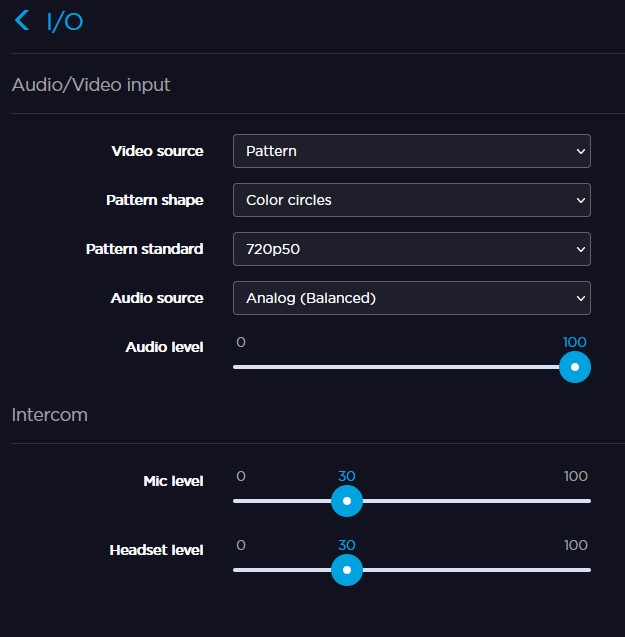
When selecting Pattern, the Pattern Shape and the Pattern Standard fields appear.
On the upper part of the screen, an icon indicates the selected source:
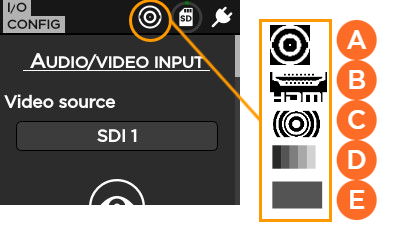
 SDI
SDI HDMI
HDMI Color circles pattern
 Color bars pattern
 Black pattern
You can preview the selected video source.
Tap
 to preview the video.
Web Interface
From the Web Interface, click Settings > I/O.
From the Video Source dropdown, select the source.
Note
If you select Pattern, define the shape and the resolution to be used.
If you select SDI, HDMI, or Auto, the video resolution is automatically detected.